[元件] Interceptor
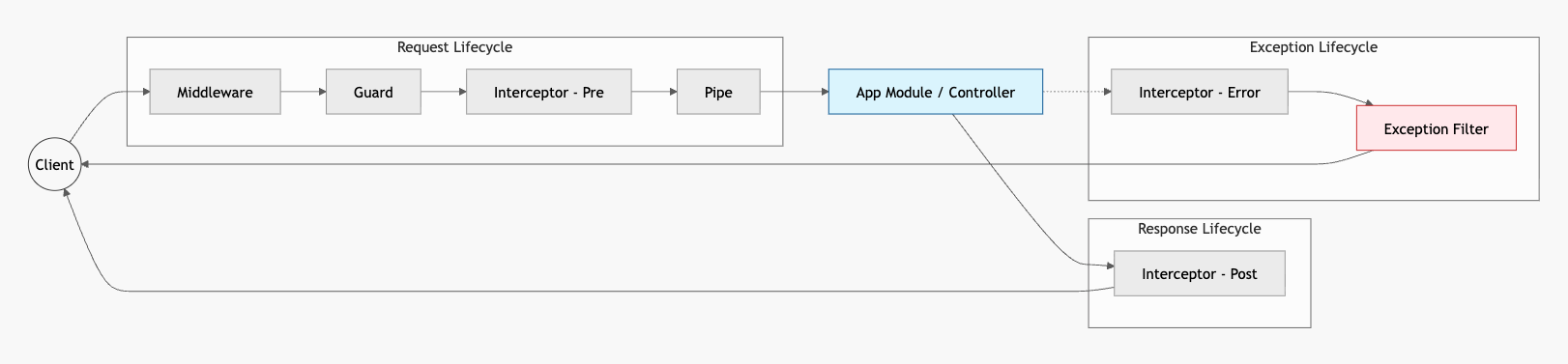
interceptor 能取得上下文資訊來擴展邏輯,包含:
- 統一請求與回應的資料格式、空值處理
- 效能監控,例如每次請求的耗時
- 繞過 controller,回傳快取資料
架構
intercept 是元件實際會執行的內容。
intercept 的參數:
ExecutionContext繼承自ArgumentsHost,可以取得執行環境的上下文CallHandler類似 middleware 的NextFunction,必須回傳next.handle()才能運行流程
在 return 前的邏輯會在請求階段執行,在 next.handle() 串起來的 pipe 會在回應階段執行:
import { CallHandler, ExecutionContext, Injectable, NestInterceptor } from '@nestjs/common';import { Observable } from 'rxjs';
@Injectable()export class TestInterceptor implements NestInterceptor { intercept(context: ExecutionContext, next: CallHandler): Observable<any> { console.log('請求階段的 TestInterceptor');
return next.handle().pipe( map((data) => { console.log('回傳 Data: ', data); console.log('回傳階段的 TestInterceptor'); return data; }), ); }利用 context 取得的資料,就可以在 pipe 中重組回應物件的格式:
@Injectable()export class TestInterceptor implements NestInterceptor { intercept(context: ExecutionContext, next: CallHandler): Observable<any> { const ctx = context.switchToHttp(); const response = ctx.getResponse<Response>(); const status = response.statusCode; const reqTime = new Date();
console.log(`TestInterceptor 在 ${reqTime.toISOString()} 攔截了請求`);
return next.handle().pipe( map((data) => { const resTime = new Date(); const duration = resTime.getTime() - reqTime.getTime(); console.log(`TestInterceptor 在 ${resTime.toISOString()} 回傳了請求`); console.log(`請求總耗時:${duration} ms`);
return { data, status, duration, }; }), ); }}錯誤捕捉
資料格式的轉換也包含錯誤捕捉。
pipe 有提供 catchError 可以讀取 Error 物件,將特定的錯誤轉換後再拋給 exception filter 處理:
@Injectable()export class ErrorsInterceptor implements NestInterceptor { intercept(context: ExecutionContext, next: CallHandler): Observable<any> { return next.handle().pipe( catchError((err) => { // 1. 判斷是否為特定的業務邏輯錯誤(例如 TypeORM 的 EntityNotFound) if (err.name === 'EntityNotFoundError') { return throwError(() => new NotFoundException('找不到該筆資料')); }
// 2. 也可以在這裡進行錯誤日誌記錄 console.error('偵測到未處理錯誤:', err.message);
// 3. 繼續拋出錯誤,讓後續的 exception filter 處理 return throwError(() => new InternalServerErrorException('伺服器內部錯誤')); }), ); }}部分套用
使用 @UseInterceptors 套用在 handler 或是整個 controller:
@Get('/:id')@UseInterceptors(TestInterceptor)testId(@Param('id') id: string) { return `test ${id}`;}@UseInterceptors(TestInterceptor)@Controller('test')export class TestController { //...}全域套用
在根模組進行注入:
import { APP_INTERCEPTOR } from '@nest/core';
@Module({ controllers: [AppController], providers: [ { provide: APP_INTERCEPTOR, useClass: TestInterceptor, }, ],})export class AppModule {}或是在啟動程序裡面呼叫 useGlobalInterceptors 並傳入實例:
async function bootstrap() { const app = await NestFactory.create(AppModule); // 建立實例 app.useGlobalInterceptors(new TestInterceptor()); await app.listen(process.env.PORT ?? 3000);}小結
interceptor 透過 RxJS 包裝了 controller 的執行前後的作業流程,通常用來處理涉及業務邏輯或需要回傳值的情境。